How to get Steam wishlists from TikTok
TikTok can show your game to a lot of people who have never heard of it. Turning those views into Steam wishlists takes a few extra steps, because of how TikTok handles links. This guide covers where to put your link, what happens when someone taps it, and how to see what's working.
Where your link can go
On TikTok, the link in your bio is the only one most accounts can make clickable.
- Your bio. TikTok only lets some accounts add a website to their bio. At the time of writing, that's personal accounts with at least 1,000 followers, and business accounts. To check yours, tap Edit profile and look for a Website field.
- A verified business account. If your studio is a registered business, you can switch to a business account and verify it with your EIN (your business's tax ID in the US). That lets you add the link before you reach 1,000 followers, so you get link clicks while you're still growing your account.
- Captions and comments. Links there aren't clickable. People would have to copy the link by hand, and almost nobody does. Write "link in bio" instead, in the caption or a pinned comment.
If you can't add a link yet, say your game's name clearly, on screen and in the caption, so people can search for it on Steam later. "Wishlist [your game] on Steam" is enough.
What happens when someone taps your link
TikTok opens links in its own browser, inside the app. People are almost never signed in to Steam there, so when they press "Add to your wishlist", Steam asks them to sign in first. Most people won't type their Steam password inside another app, so they leave.
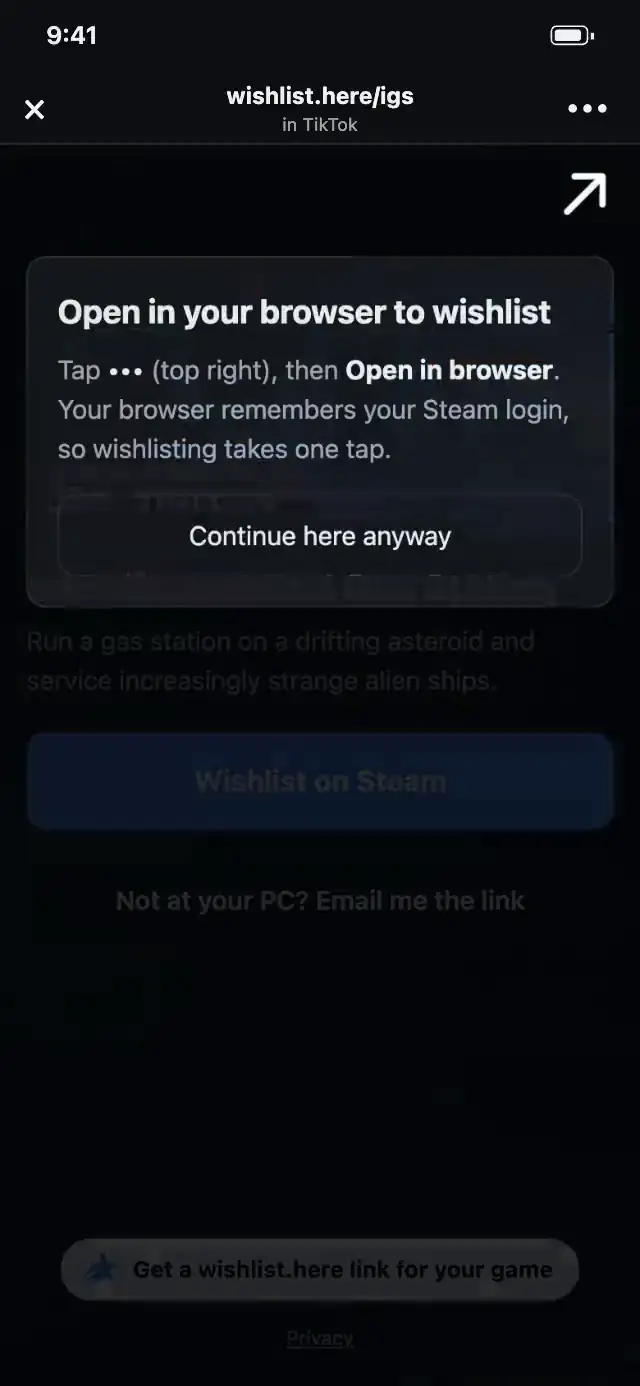
There is a way out: the ••• button at the top right of TikTok's browser has an Open in browser option. That opens the page in their normal browser, where they're more likely to be signed in to Steam. But few people know it's there.
Even in their normal browser, a lot of people aren't signed in to Steam on their phone. Those people can still wishlist later on their PC, if they remember.
Make the video ask for the wishlist
- Show the game's name early, on screen, so people know what they're looking at.
- Ask for the wishlist directly, in the video or the caption, and say the link is in your bio.
- Use the same link for every video, so people who come back can find it.
- Reply to comments asking where to get the game with the game's name and where the link is.
See which videos bring in wishlists
TikTok shows views, likes and profile visits for each video. Steam shows wishlists. Connecting the two is the hard part.
If your link goes straight to Steam, add a tag to it, like ?utm_source=tiktok, and check Steam's UTM Analytics report. But Steam only counts visits from people who are signed in to Steam, and most people coming from TikTok aren't, so the report will show fewer visits than you really got. How to make a Steam wishlist link explains the tags and the report in more detail.
It also helps to write down when you post each video and look at your daily wishlists in Steamworks over the next few days.
What wishlist.here does
We're indie developers, and we post our own game on TikTok. We made wishlist.here for these problems, and it's free. You put a link like wishlist.here/yourgame in your bio:
- Inside TikTok, the Wishlist on Steam button shows people how to open the page in their normal browser, like in the picture above.
- People who can't wishlist right then can email themselves the link for later, and can sign up for your mailing list.
- On a PC, the link goes straight to your Steam page.
- Your dashboard shows how many visitors came from TikTok, how many got out of TikTok's browser, and how many tapped to wishlist. If you add a Steamworks key, your Steam wishlists are on the same chart.
With Pro, an optional paid plan, you can also post videos to TikTok, Instagram Reels and YouTube Shorts at once, and see an estimate of the wishlists each video brought in.